Changelog
Zapier, AI Insights and more

Zapier integration
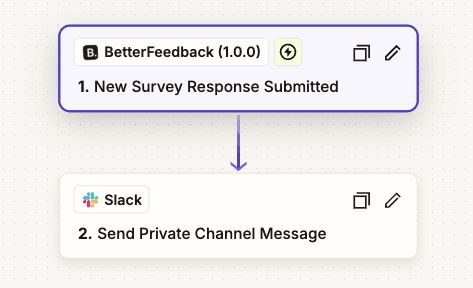
Connect BetterFeedback with 5,000+ tools to automatically act on completed AI survey conversations. Once a response is submitted, workflows can run without manual steps.
Use Zapier to generate Google Docs from templates for each response, send data to Google Sheets or Airtable, and add respondents directly to CRMs or mailing lists.
AI Insights
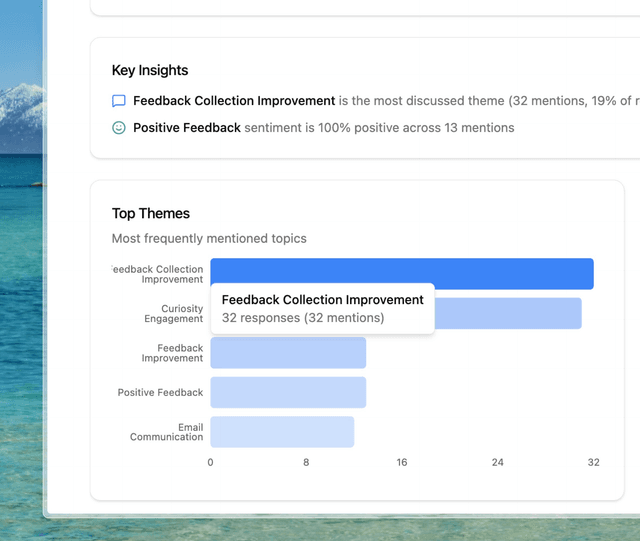
Get a clear, structured view of what respondents are actually saying. AI Insights surface top themes, recurring pain points, key takeaways, and sentiment trends over time, turning raw conversations into actionable understanding without manual analysis.
AI analysis UI refresh
The AI analysis interface has been simplified and visually aligned to reduce cognitive load. Insights, themes, and sentiment are easier to scan and interpret at a glance.
My Surveys list improvements
The surveys list has been refactored to make ownership and activity immediately visible. You can now quickly see surveys alongside their response counts and current status.
Survey sorting
Surveys can be sorted by name, status, response count, or creation date, making it faster to find what matters in larger workspaces.
Questions layout refinement
Question editing and viewing has been made more subtle and compact, keeping focus on content rather than controls.
Responses UI improvements
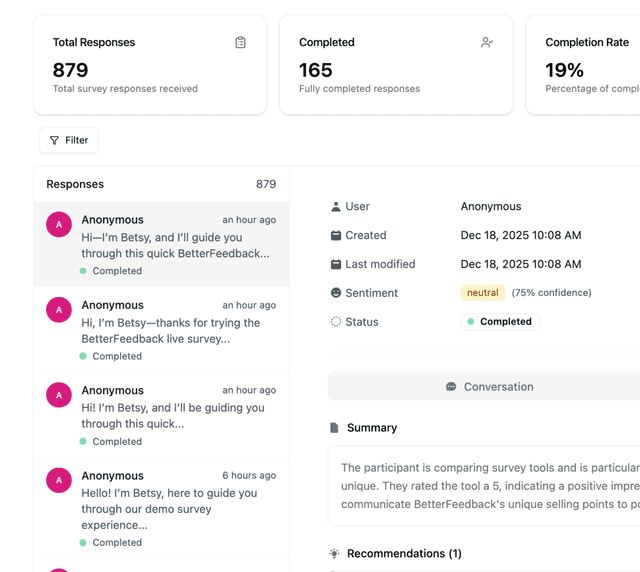
The responses view has been reworked to improve navigation and readability, making it easier to move through conversations and review feedback efficiently.
Drag-and-drop stability
Question reordering via drag and drop is now smoother and more reliable, eliminating flicker and unintended jumps during editing.
Agent message readability
Long AI agent responses are now split into shorter paragraphs. This improves scanability and reduces cognitive load when reviewing conversations.
Response status filtering
Responses can now be filtered by status: completed, partial, or no response. This makes it easier to separate finished conversations from drop-offs and follow up where needed.
Follow-up question grouping
Follow-up questions are now visually grouped with their original question. Context is preserved, making it easier to understand why a follow-up was asked and how the response evolved.
Survey action rename
The “Complete Survey” action has been renamed to “Close Survey” to better reflect its actual behavior and avoid confusion at the end of a survey lifecycle.